Student-Led Lab: Rethinking 3D Printing in Product Design Education
The 3D printing lab started with a simple question: what happens when students are trusted to manage the making process themselves?
For a long time, 3D printing in design education can easily become a service. A student prepares a file, sends it to someone else, waits for the result, and collects the print when it is finished.
That model works, but it creates distance between the student and the process. In product design, that distance matters. A print is not just an output. It is a test. It shows scale, fit, proportion, tolerance, strength, failure, and sometimes all the things the CAD model did not show.
At SETU Product Design, we have been developing a student-led 3D printing lab to bring that process closer to the students. The aim is not just to give students access to more machines. It is to make 3D printing part of everyday studio practice.
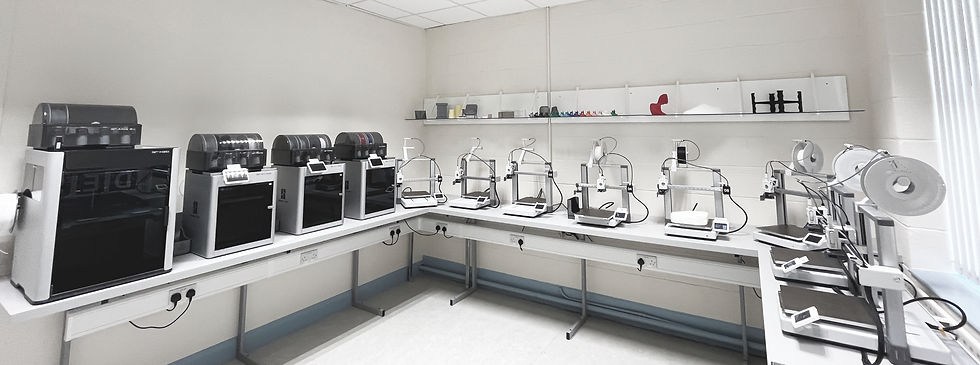
The dedicated lab is located beside the design studios, making it easy for students to move between CAD, studio work, printing, testing and refinement. The space is equipped with Bambu Lab FDM printers, including Bambu Lab A1s, X1 Carbons and an H2D, supporting rapid prototyping and iteration across the programme.
Access Changes Behaviour
One of the biggest changes has been access. When students can use the lab directly, printing becomes less of a final step and more of a working method. Students are more likely to print early, test quickly, make changes, and print again. That shift is important.
The print is no longer treated as the polished final model at the end of a project. It becomes part of the design conversation. It helps students ask better questions: does this fit, does it feel right, is the scale correct, does the mechanism work, is the wall thickness strong enough, have I modelled this properly? That kind of learning is difficult to get from the screen alone.
A Student-Led System
The lab is structured around student responsibility. Students book and log printers, manage their own print jobs, report issues, and learn how to look after the space. A simple online logging system supports this by making printer use visible and accountable.
Students can see which machines are in use, log when a print starts and finishes, and flag problems quickly when something needs attention. This helps the lab function as a shared working space rather than a staff-controlled service.
We also introduced personalised “POG” markers, which students use to identify and claim machines while prints are running. It is a small thing, but it matters. It gives visibility to who is using what, while also adding a sense of ownership to the space. The message is simple: this is your lab, but that also means you have a responsibility to use it properly.
Staff Still Matter, But the Role Changes
A student-led lab does not mean students are left alone. Staff and technical support are still central, but the role changes. Instead of controlling every print, staff can spend more time helping students think about why they are printing, when to print, and what they are trying to learn from the result.
That changes the conversation. Rather than asking, “Can I print this?” students begin asking, “What am I trying to test?” or “What should I change before the next version?” That is a much more useful design discussion.

Peer Learning Becomes Part of the Culture
One of the most valuable things to emerge from the lab has been peer learning. Students learn a lot from staff, but they also learn from each other: how to orient a print, how to reduce supports, how to fix a failed first layer, how to choose settings, how to think about tolerances, how to split a model, or how to redesign something so it prints more cleanly.
This kind of learning is often informal, but it is powerful. A second-year student might learn from a fourth-year student. A third-year student might troubleshoot a print for someone else. A student who struggled with a setting last week may be the person explaining it to someone else this week.
That is when the lab starts to feel less like a room of machines and more like a studio culture.
Printing as Part of Thinking
The real value of the lab is not the number of prints produced. It is the change in how students think. When 3D printing is easy to access, students are more willing to use it as part of their design process. They can move between SolidWorks and the physical object more often. They can use failed prints as feedback. They can test form, assembly and scale before committing to a final outcome.
This helps students understand that 3D printing is not a shortcut. It is not the answer to every design problem. It is one tool within a wider design process. Sometimes the best decision is to print. Sometimes it is to sketch, model in foam, laser cut, test with card, or go back to CAD.
The aim is to help students develop the judgement to know the difference.
Why This Matters
For me, the lab is about more than machines. It is about agency, confidence and responsibility. It is about helping students move from being users of technology to becoming thoughtful designers who know how to use technology critically.
A 3D printer can produce a part, but the learning happens around the decisions: when to print, what to test, what failed, what changed, and what the next version needs to do better. That is why the student-led model matters.
It turns 3D printing from a service into part of the studio. It gives students ownership of the process, while also asking them to take care of the space, support each other, and use the tools with purpose.
The next step is to research this more formally. We are beginning to look at how autonomous access affects student confidence, CAD engagement, peer learning and iterative prototyping across the programme. But even before the data is collected, the day-to-day change is visible in the studio.
Students are printing earlier. They are testing more. They are helping each other. They are learning from failed prints. And that is exactly where the value is.


Comments